

D
Deleted member 589304
Guest
This is a pretty basic question.
I just built a computer and Has a
GA-z68Xp-UD3 mother board by GIGABYTE.
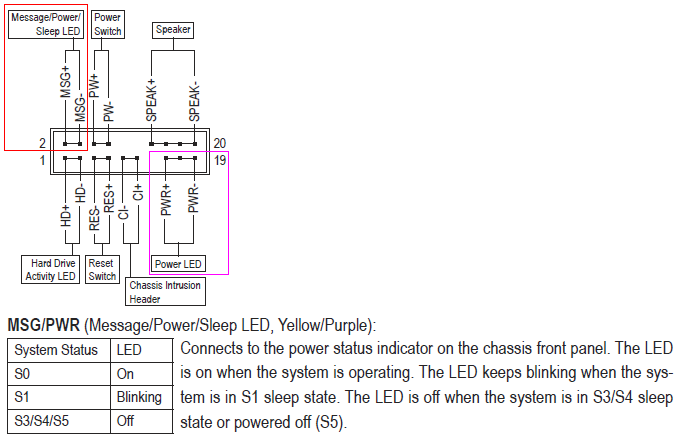
I am trying to hook up my front header panel and cant figure out what to do with the power LED.
On this motherboard there are three pins for the header to connect to, on my case I only have two wires coming down. So my question is how do I connect this? Do I need some kind of converter or something or?
Or
do I only use the two and don't need all three pins?
The mother board pins look like this.
(+)(middle pin)(-)
So would I just plug positive to positive and negative to negative and not need the middle one.
Thanks
I just built a computer and Has a
GA-z68Xp-UD3 mother board by GIGABYTE.
I am trying to hook up my front header panel and cant figure out what to do with the power LED.
On this motherboard there are three pins for the header to connect to, on my case I only have two wires coming down. So my question is how do I connect this? Do I need some kind of converter or something or?
Or
do I only use the two and don't need all three pins?
The mother board pins look like this.
(+)(middle pin)(-)
So would I just plug positive to positive and negative to negative and not need the middle one.
Thanks






































 Facebook
 Twitter
 Instagram